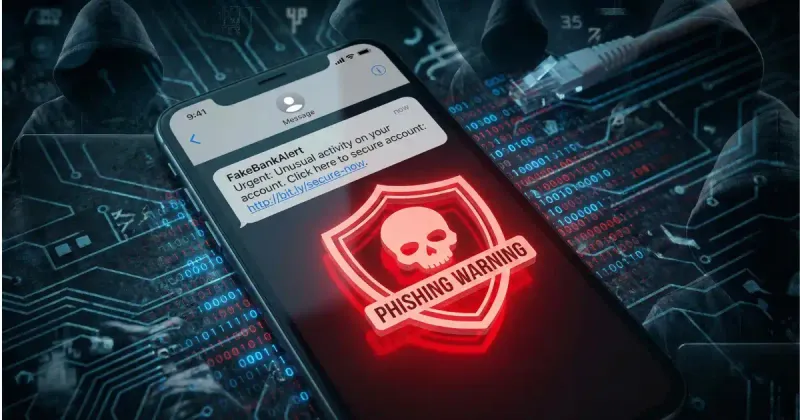
Smishing (SMS phishing) is a cyberattack that uses text messages to trick recipients into revealing sensitive information, clicking malicious links, or downloading harmful software. The term combines “SMS” and “phishing”—the fraudulent practice of impersonating trusted entities.
With SMS open rates exceeding 98%, smishing has become one of the most effective attack vectors for cybercriminals. In 2025 alone, Americans lost over $10 billion to SMS-based scams.
How Smishing Differs from Other Attacks
| Attack Type | Channel | Method |
|---|---|---|
| Smishing | SMS/Text | Malicious text messages |
| Phishing | Fraudulent emails | |
| Vishing | Voice call | Phone call scams |
| Quishing | QR codes | Malicious QR codes |
Why Smishing Works
Smishing exploits several psychological and technical factors:
1. Trust in SMS
People trust text messages more than email:
- SMS feels personal (from phone contacts)
- No “spam folder” for texts
- Urgent messages demand immediate attention
2. Mobile Limitations
- Smaller screens hide URL details
- Harder to verify sender identity
- Quick actions encouraged by mobile UX
3. Urgency Tactics
Scammers create artificial pressure:
- “Act within 24 hours”
- “Your account will be suspended”
- “Delivery arriving today”
Common Smishing Examples
1. Fake Delivery Notifications
The most prevalent smishing attack impersonates shipping companies:
Fake USPS/FedEx/UPS Message:
USPS: Your package cannot be delivered due to
incomplete address. Update here: usps-redelivery.com
Red flags:
- Generic “your package” (no tracking number)
- Suspicious domain (not usps.com)
- Creates urgency around delivery
Real delivery notifications:
- Include specific tracking numbers
- Come from verified sender IDs
- Link to official domains (usps.com, fedex.com)
2. Bank and Financial Scams
Impersonating banks to steal credentials:
Fake Bank Alert:
ALERT: Unusual activity detected on your
Chase account. Verify now to avoid suspension:
chase-secure-verify.com
Fake PayPal/Venmo:
PayPal: Your account has been limited.
Confirm your identity: paypal-verify.info
Red flags:
- Banks never ask for passwords via SMS
- Suspicious domains with extra words
- Threats of account suspension
3. Amazon Scam Texts
Amazon impersonation is extremely common:
Fake Amazon Order:
Amazon: Your order for $849.99 iPhone has shipped.
If you didn't make this purchase, cancel here:
amzn-orders-cancel.com
Fake Amazon Prize:
Congratulations! You've won the Amazon $1000
Gift Card Giveaway! Claim now: amazon-prize.net
Red flags:
- Amazon sends notifications through the app
- Prize scams are almost always fraudulent
- Non-amazon.com domains
4. Government Impersonation
Scammers pose as IRS, Social Security, or other agencies:
Fake IRS Message:
IRS: You have an outstanding tax refund of $1,284.
Claim your refund immediately: irs-refund-claim.com
Red flags:
- IRS never initiates contact via SMS
- Government agencies use official mail
- Suspicious domains
5. Account Verification Scams
Targeting online accounts:
Fake 2FA/OTP Request:
Your Google verification code is 847291.
If you didn't request this, secure your account:
google-security.info
Red flags:
- Legitimate 2FA codes don’t include links
- Real codes come from verified short codes
- Google uses “G-” prefix for codes
6. Tech Support Scams
Claiming device or account issues:
Fake Apple Support:
Apple: Your iCloud storage is 95% full.
Upgrade now to avoid losing your photos:
icloud-upgrade.com
Red flags:
- Apple communicates through Settings app
- Non-apple.com domains
- Creates fear of data loss
How to Identify Smishing
Smishing Detection Checklist
- Unexpected message: You didn’t initiate contact
- Generic greeting: No personalization (“Dear Customer”)
- Urgency language: “Immediately,” “within 24 hours”
- Suspicious links: Not the official domain
- Request for info: Asks for passwords, SSN, card numbers
- Unknown sender: Unrecognized phone number
- Grammar errors: Typos, awkward phrasing
- Too good to be true: Prizes, unexpected refunds
URL Red Flags
| Legitimate | Suspicious |
|---|---|
| usps.com | usps-tracking.info |
| chase.com | chase-secure-verify.com |
| amazon.com | amzn-orders.net |
| paypal.com | paypal-verify.info |
| apple.com | icloud-support.com |
Sender ID Warnings
Legitimate companies typically use:
- Verified sender IDs (brand name appears)
- Consistent short codes
- Numbers you recognize from previous communications
Smishing often comes from:
- Random 10-digit phone numbers
- International numbers (+44, +91, etc.)
- Numbers that change frequently
What to Do If You Receive a Smishing Text
Step-by-Step Response
-
Don’t click any links
- Even “unsubscribe” links can be malicious
-
Don’t reply
- Confirms your number is active to scammers
-
Verify independently
- Contact the company directly using official channels
- Type the URL manually in your browser
- Call the number on your card (not the text)
-
Report the message
- Forward to 7726 (SPAM) in the US
- Report to FTC at reportfraud.ftc.gov
- Report to your carrier
-
Block the sender
- Prevents future messages from that number
-
Delete the message
- Remove temptation to click later
What to Do If You’ve Been Smished
If you clicked a link or provided information:
Immediate Actions
| If You Shared… | Do This Immediately |
|---|---|
| Bank account info | Contact your bank, freeze accounts |
| Credit card number | Call card issuer, request new card |
| Social Security Number | Freeze credit at all 3 bureaus |
| Password | Change it everywhere it’s used |
| Nothing (just clicked) | Run antivirus scan, monitor accounts |
Credit Freeze Contacts
| Bureau | Phone | Website |
|---|---|---|
| Equifax | 1-800-349-9960 | equifax.com/personal/credit-report-services |
| Experian | 1-888-397-3742 | experian.com/freeze |
| TransUnion | 1-888-909-8872 | transunion.com/credit-freeze |
Long-term Monitoring
- Monitor bank statements weekly
- Check credit reports (annualcreditreport.com)
- Set up fraud alerts
- Enable 2FA on all accounts
- Consider identity theft protection service
How Businesses Can Prevent Brand Impersonation
If you send legitimate SMS, protect your customers from smishing:
For Businesses Sending SMS
| Best Practice | Implementation |
|---|---|
| Use verified sender ID | Register with carriers |
| Use short codes | More trustworthy than random numbers |
| Include brand name | ”BrandName: Your order shipped…” |
| Avoid URL shorteners | Use full branded domains |
| Educate customers | Tell them what to expect |
| Never request sensitive data | Don’t ask for passwords via SMS |
Sample Customer Education Message
REMINDER: [BrandName] will NEVER ask for your
password, SSN, or full card number via text.
Report suspicious messages to security@brand.com
Smishing Statistics (2025-2026)
| Statistic | Value |
|---|---|
| Global smishing attacks | 3.4 billion annually |
| US losses to SMS scams | $10+ billion (2025) |
| Average loss per victim | $1,000+ |
| Most targeted age group | 18-44 years old |
| Peak attack periods | Holiday shopping season |
| Delivery scam percentage | 35% of all smishing |
| Bank impersonation | 25% of all smishing |
Technical Defenses Against Smishing
For Individuals
-
Enable spam filtering
- iPhone: Settings > Messages > Filter Unknown Senders
- Android: Messages > Settings > Spam protection
-
Use call/SMS blocking apps
- Truecaller
- Hiya
- RoboKiller
-
Keep software updated
- Security patches address vulnerabilities
-
Use unique passwords
- Password manager recommended
- Limits damage if one account compromised
For Enterprises
-
Implement STIR/SHAKEN
- Caller ID verification protocol
- Reduces spoofing
-
Use registered A2P messaging
- 10DLC or short code registration
- Builds carrier trust
-
Monitor for brand impersonation
- Domain monitoring services
- Takedown services for fake sites
Smishing vs Legitimate SMS Comparison
| Aspect | Smishing | Legitimate Business SMS |
|---|---|---|
| Sender | Unknown number | Verified/recognized sender |
| Personalization | Generic | Uses your name/account details |
| Links | Suspicious domains | Official company domains |
| Requests | Passwords, SSN, card numbers | Order updates, confirmations |
| Urgency | ”Immediate action required!” | Informational tone |
| Opt-out | None or fake | Clear STOP instructions |
| Grammar | Often errors | Professional writing |
Reporting Smishing
United States
- Forward to 7726 (SPAM): Free on all carriers
- FTC: reportfraud.ftc.gov
- FBI: ic3.gov (Internet Crime Complaint Center)
United Kingdom
- Forward to 7726
- Action Fraud: actionfraud.police.uk
Australia
- Scamwatch: scamwatch.gov.au
- Forward to carrier
Conclusion
Smishing attacks continue to grow in sophistication, leveraging the trust people place in text messages. The best defense is awareness—knowing what to look for and how to verify suspicious messages independently.
Key takeaways:
- Never click links in unexpected texts—verify through official channels
- Look for red flags: urgency, generic greetings, suspicious domains
- Report smishing to 7726 (SPAM) and the FTC
- If compromised: act immediately to freeze accounts and change passwords
- Legitimate companies never ask for passwords or SSN via SMS
Understanding SMS technology helps you spot fakes. Learn more about how legitimate SMS systems work to better protect yourself from scams.
Related Articles
WhatIsSMS.com
SMS Technology Guide